Abstract geometric pattern of light blue thin lines and dots forming interlocking cubes and hexagons in the top left corner.
Claims Workbench

Give claims professionals one clear place to move every claim forward.

From claim creation through payment, the Claims Workbench brings claim information, parties, tasks, requirements, documents, decisions, approvals, and audit history together in one connected examiner experience.
Branching workflow arrows representing clear next steps.

Make ownership and next steps clear

Circular data-transfer arrows representing connected systems.

Reduce system switching and duplicate entry

Clock and checked record representing traceable claim activity.

Keep actions, decisions, and handoffs traceable

Briefcase representing support across lines of business.

Support multiple lines of business in one consistent experience
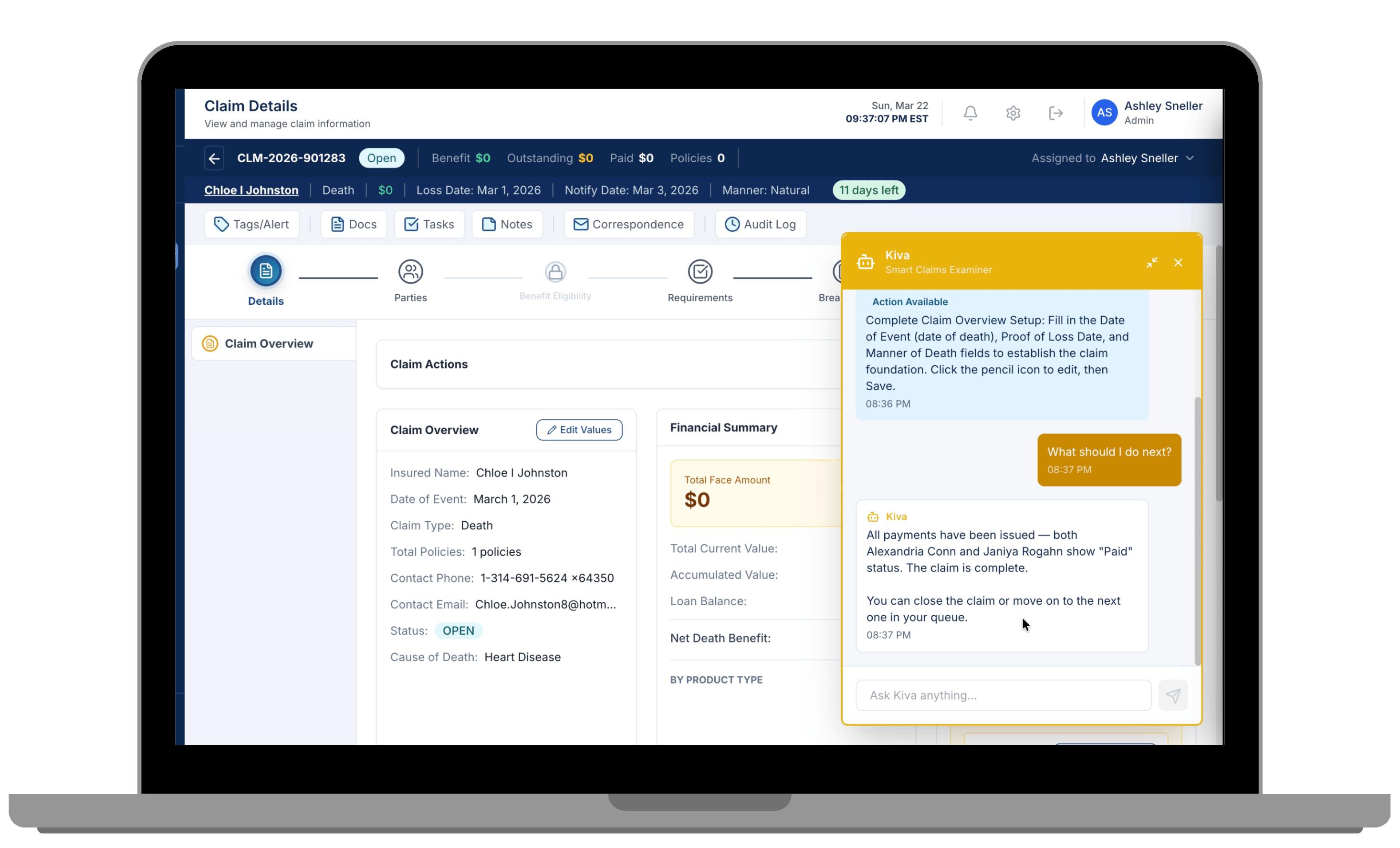
Benekiva claims workbench with claim details and guidance from the Kiva AI assistant.

Proven to Deliver

See how leading carriers have transformed their claims processes with Benekiva.

80%

Faster claim turnaround time

70%

Straight-through processing

35%

Higher claimant satisfaction

Keep the work connected from claim creation to payout

A claim can enter through digital submission, a connected carrier system, or internal setup. Once created, Claims Workbench supports the operational journey through review, requirements, decisions, approvals, payment preparation, and close.

Tasks & SLAs
Notes & History
Audit Trail
Role-Based Access
Connected Data
Hand providing a document representing requirements and documentation.

4. Requirements & Documents

Outstanding information, document review, and follow-up

Checked gear representing decision and approval.

5. Decision & Approval

Review, exceptions, specialist input, and approvals

Approved payment representing payment and closeout.

6. Payment & Close

Payees, allocations, payment preparation, final approval, and close

Know where the claim stands and what comes next

A guided timeline shows progress through the claim and brings the next work into view without forcing examiners to interpret disconnected queues, status codes, or unlabeled actions.

Manage the work, not just the status

Turn document review, approvals, legal review, recertifications, and other claim activity into assigned tasks with owners, service-level expectations, and a clear history of what happened.

Review the document without losing the claim

Keep the source document and claim information side by side so examiners can review what was submitted and update the record without moving back and forth between windows.

Prepare payment without losing the claim context

Keep payees, allocations, settlement instructions, interest, approvals, and payment history connected as the claim moves toward payout.

Light blue abstract geometric network pattern with hexagons and connecting lines clustered in the bottom right corner.

Built for the work behind the claim

Claims handling involves more than moving a record from one status to another. Claims Workbench organizes the tasks, requirements, parties, decisions, and payment activity behind each claim so teams have a clearer view of the work that remains.

Calendar with a checkmark representing task management.

Task-Based Work Management

Assign discrete work with owners, due dates, service expectations, and an audit history instead of relying only on broad claim statuses or queues.

Requirements & Approvals

Track what is outstanding, route exceptions, and keep review and approval activity connected to the claim.

Handshake representing relationships between claim parties and payees.

Parties, Payees & Allocations

Manage the people and organizations involved in the claim, including relationships, assignments, allocations, and payment preparation.

Folder with a magnifying glass representing searchable audit packets.

Audit History & Claim Packets

Keep actions, notes, decisions, documents, and correspondence connected, with support for on-demand claim or audit packets where configured.

Abstract geometric pattern of light blue thin lines and dots forming interlocking cubes and hexagons in the top left corner.

One tailored experience across all lines of business

Claims teams should not have to learn an entirely different platform for every product. Claims Workbench keeps navigation and work management consistent while adapting the information, requirements, calculations, reviews, and decisions to the claim type.

Life Claims

Keep beneficiaries, death-claim requirements, interest, approvals, and payment connected from review through close.

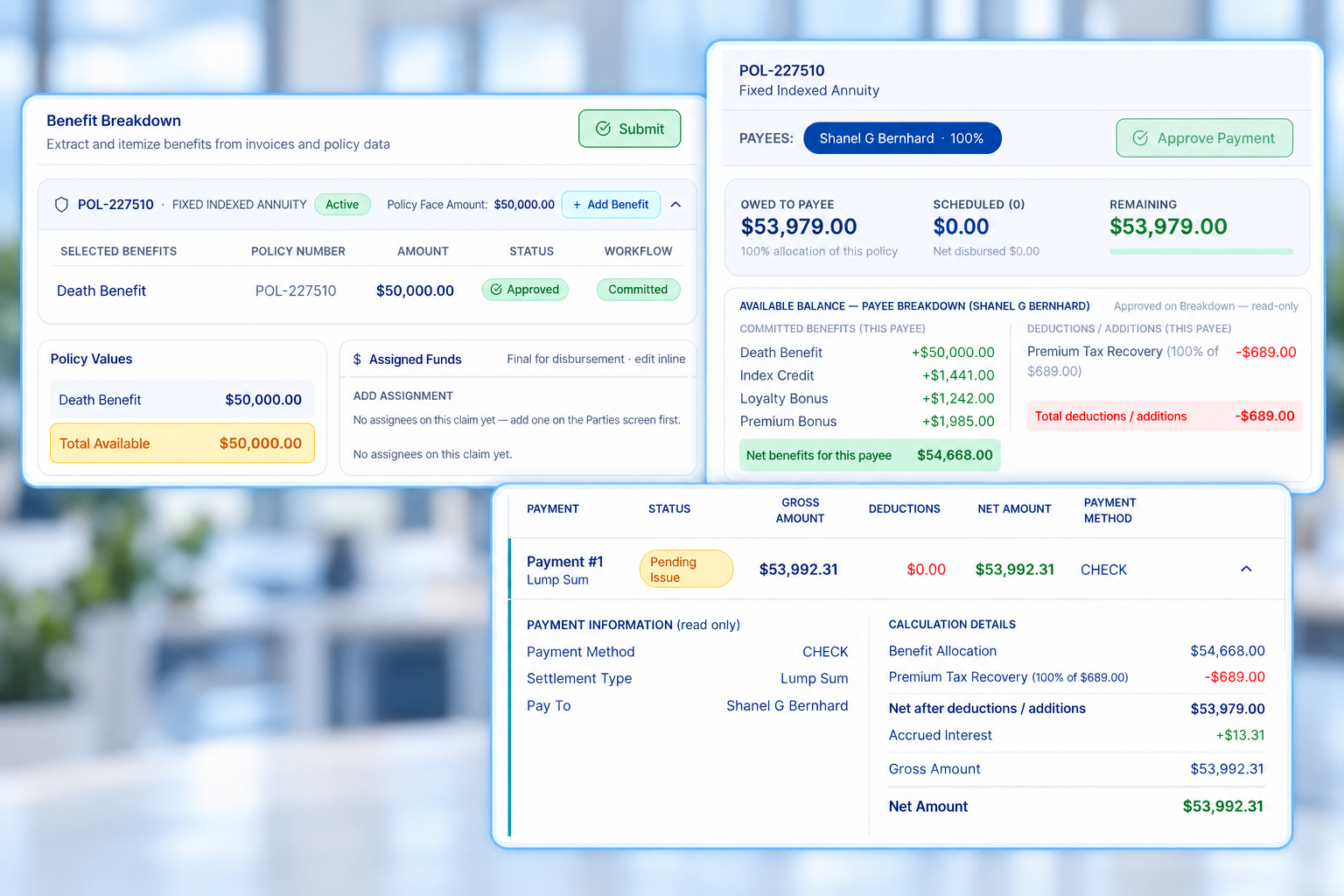
Annuities

Work with annuity-specific contract values, terminology, settlement elections, and rollover or transfer instructions.
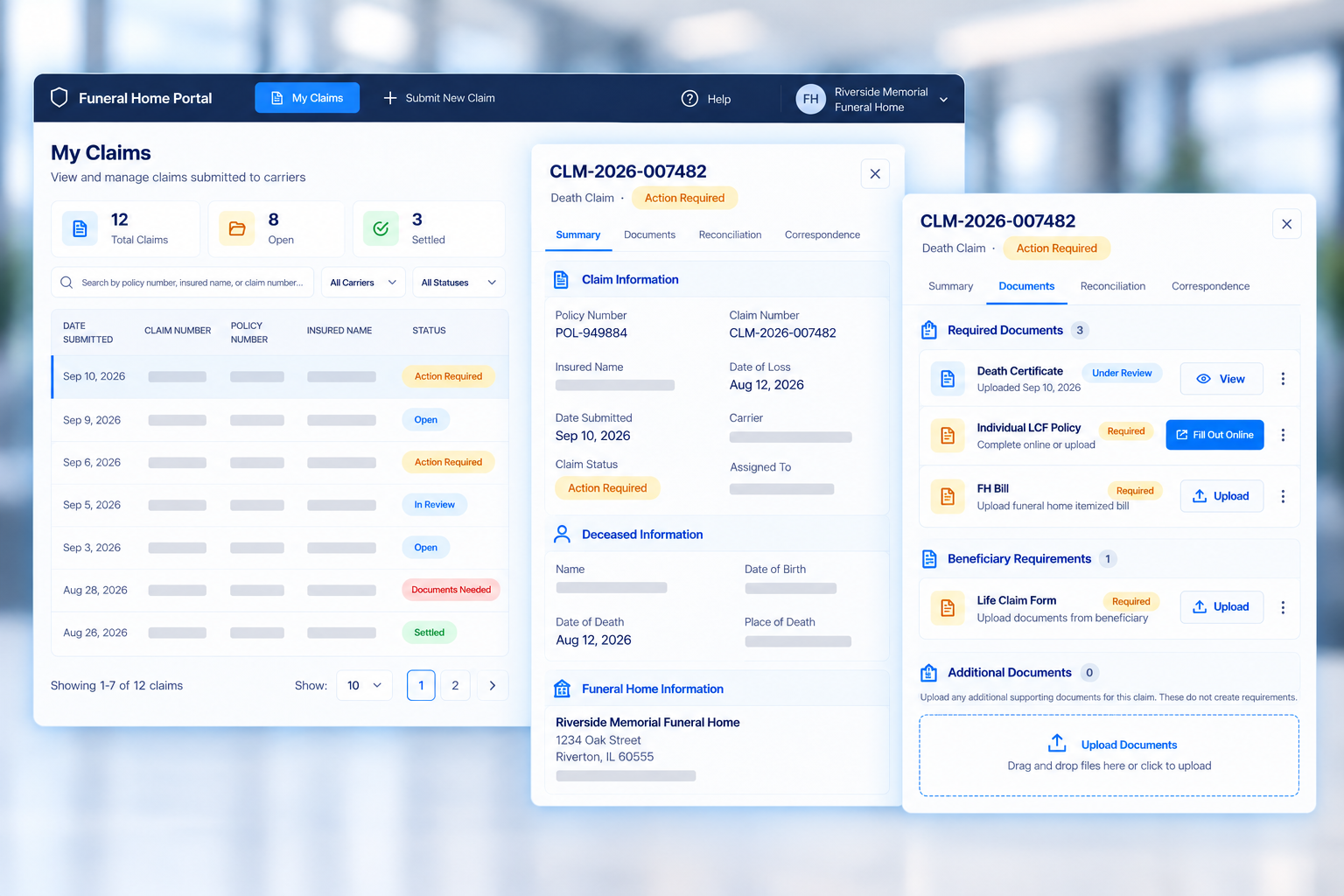
Preneed & Final Expense

Connect funeral-home interaction, assignments, requirements, and payment for routine death claims.
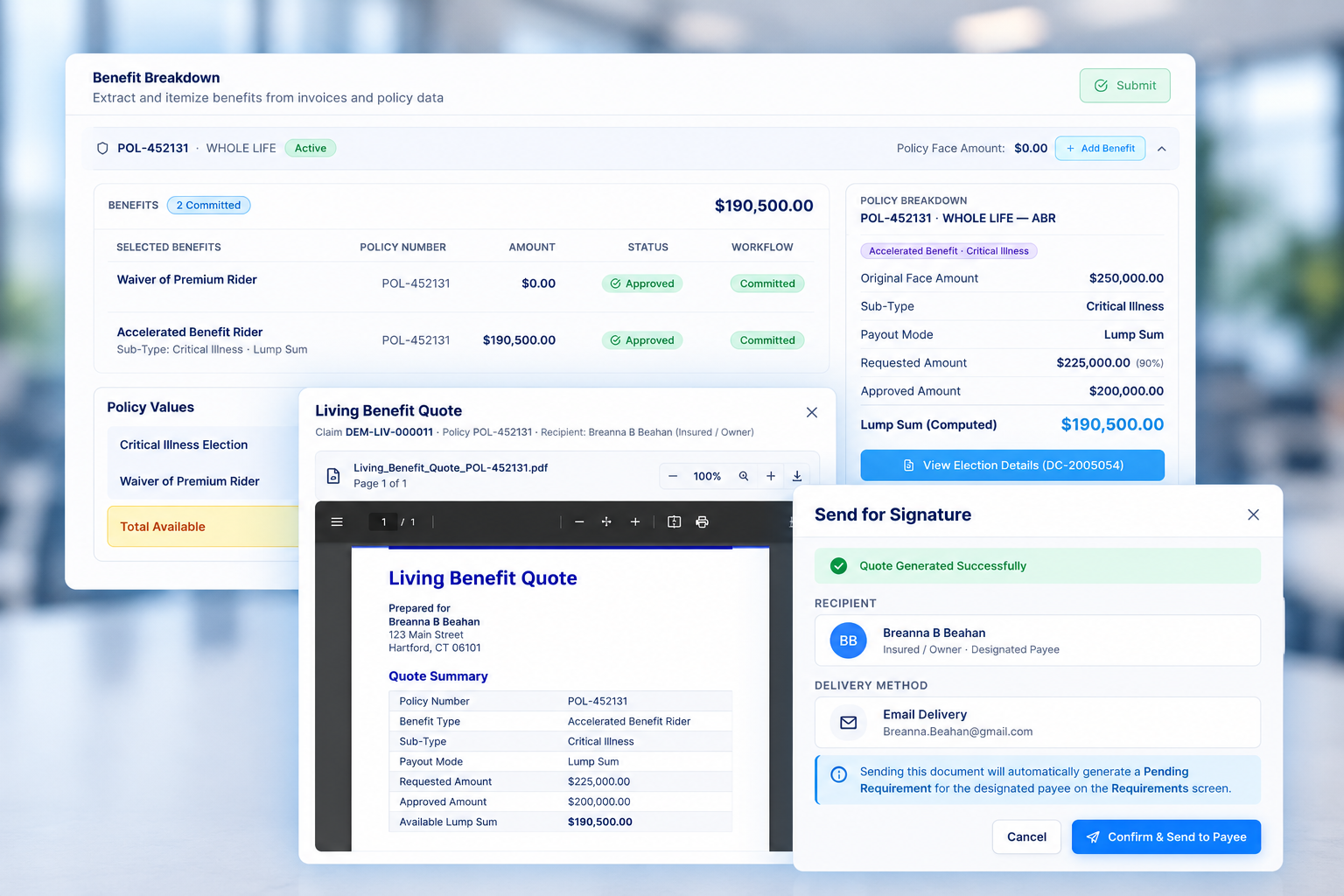
Living Benefits

Coordinate actuarial review, requested and approved amounts, quote and election, payment, and the remaining death benefit.
Long-Term Care

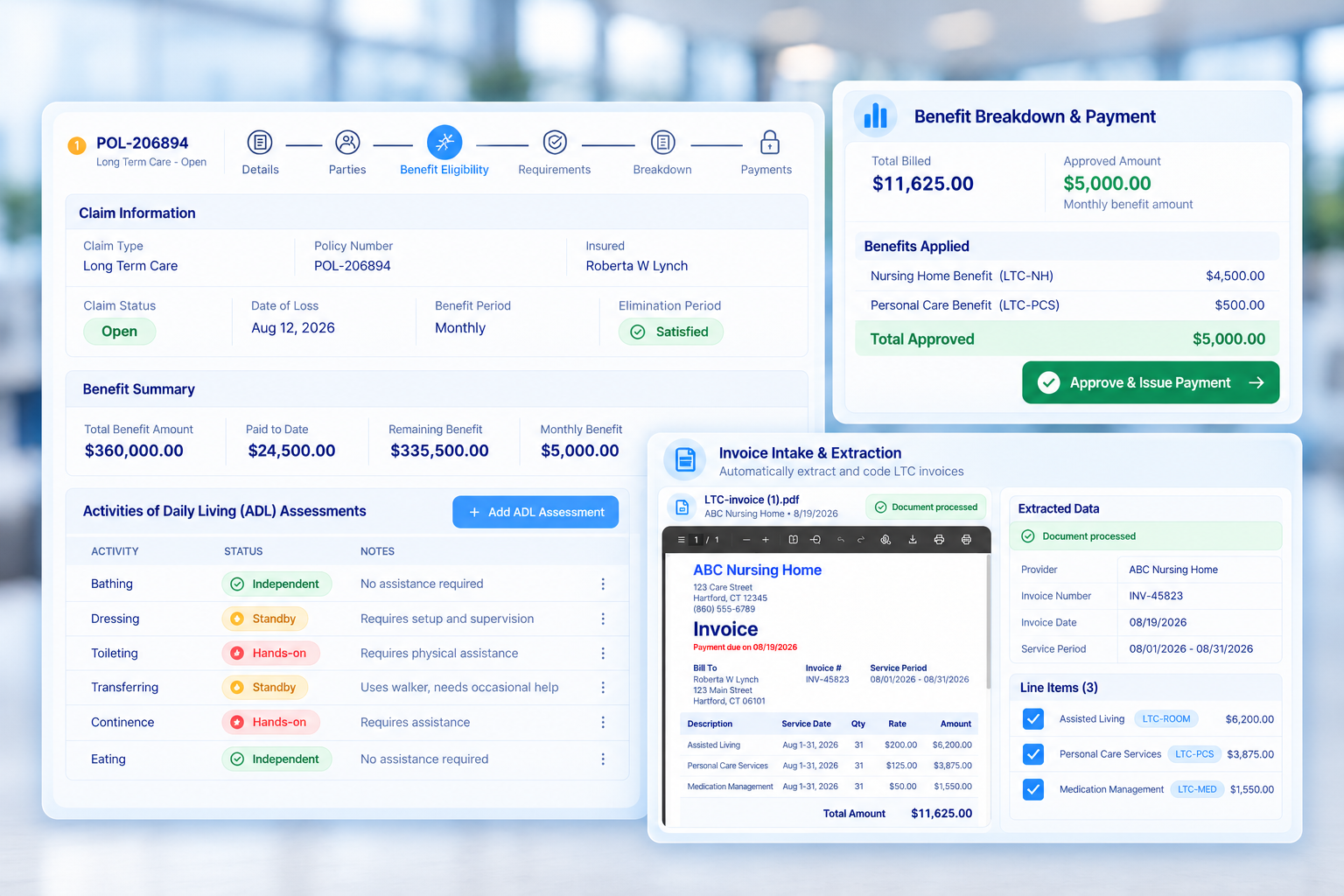
Manage ADLs, care plans, elimination periods, provider invoices, benefit pools, and recurring services over time.
Give your team one clearer place to manage the claim

Request a Demo →

Better work visibility can create breathing room.

Terry Bowling, Director of Claims at Lincoln Financial, shares practical lessons on understanding capacity, setting clearer expectations, cross-training teams, and building a more sustainable claims operation.

Read Practical Lessons from the Claims Leadership Front Lines →
Portrait of a woman with long curly red hair smiling, identified as Terry Bolling, Director of Claims at Lincoln Financial, with the Lincoln Financial logo featuring a stylized Abraham Lincoln profile.

Explore more solutions

Claim Submission

Give claimants and partners a guided digital path to provide the information and documents needed to begin.

Explore capability

Gray arrow pointing right enclosed by a semicircular arc on its left side.

Kiva, AI Smart Claims Assistant

Help claims professionals identify missing information and understand what may need attention next.

Explore capability

Gray arrow pointing right enclosed by a semicircular arc on its left side.

Nexus Orchestration Layer

Bring policy, party, document, payment, and partner data into the workflow without asking examiners to connect it manually.

Explore capability
Gray arrow pointing right enclosed by a semicircular arc on its left side.
Light blue abstract geometric network pattern with hexagons and connecting lines clustered in the bottom right corner.

Frequently Asked Questions

Everything you need to know about Benekiva's claims workbench.

What is the Benekiva claims workbench?

The Benekiva claims workbench is a unified, cloud-based claims handling software designed to manage the entire life cycle of a claim in one view. Instead of toggling between multiple screens, your team gets a single dashboard that integrates policy details, document management, and payments. By using claims workflow automation, the workbench eliminates manual data entry and provides the real-time visibility needed to process life, annuity, and long-term care claims faster and more accurately.

How does the claims workbench improve operational efficiency?

Our platform improves efficiency by removing the friction from an examiner’s daily routine. Through claims automation, Benekiva handles repetitive tasks, like status updates and data syncing, so your team can focus on complex decision-making. Features like intelligent task assignment and a built-in correspondence engine reduce the "back-and-forth" with claimants, while straight-through processing capabilities allow many claims to move from notice to payout without any manual intervention.

How does Benekiva support compliance and auditability?

Benekiva is built with a "compliance-first" mindset, maintaining a comprehensive audit trail that automatically tracks every action, document change, and decision made. With role-based access rules and automated approval checklists, you can ensure every claim follows state-specific regulations and internal business rules. This transparency ensures your team is "audit-ready" at all times, providing a permanent, searchable record that simplifies quality checks and regulatory reporting.

How does the workbench integrate with our existing systems?

Benekiva works with your tech stack, not against it. Our workbench integrates with your Policy Administration Systems and core enterprise tools to ensure data flows where it’s needed most. By streamlining the connection between Benekiva and your existing systems, we eliminate manual double-entry, reduce errors and keep your records accurate from start to finish.