Abstract geometric pattern of light blue thin lines and dots forming interlocking cubes and hexagons in the top left corner.
Intelligent Document Processing

Turn incoming documents into usable claim data.

Reduce manual review and re-keying by extracting important information from claim documents and bringing it directly into the workflow for examiner review.
Data-transfer arrows representing reduced manual data entry.

Reduce manual data entry

Folder with warning symbol representing early detection of inconsistencies.

Surface inconsistencies earlier

Hand holding a clock representing more time for review.

Give examiners more time for review and decision-making
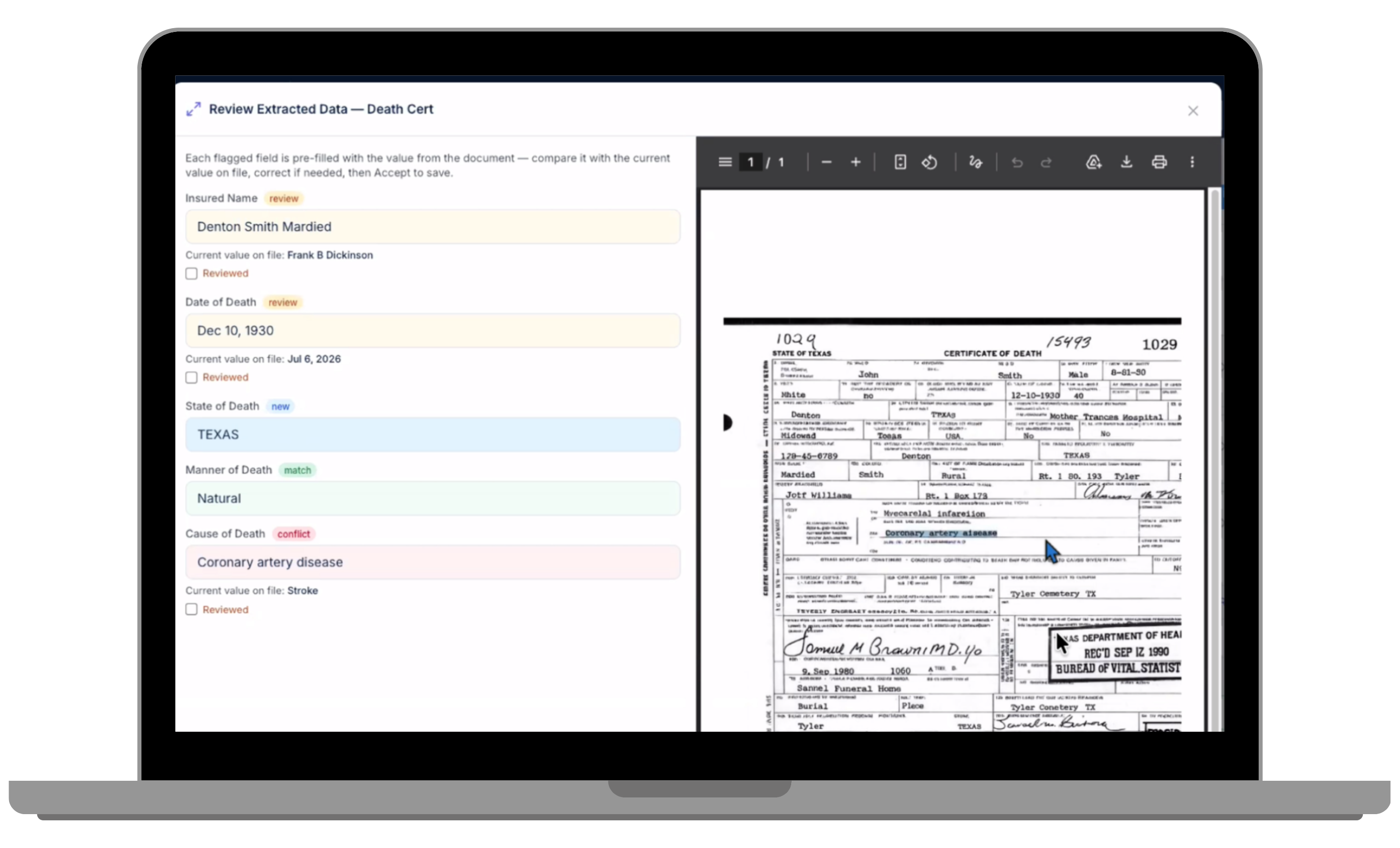
Benekiva document processing interface displaying extracted claim data alongside the original document for review.

Extract information and see what needs review

Read incoming documents, identify relevant information, and present the document side-by-side for review.

Take the typing out of invoice review

Bring provider invoice details into the claim without asking examiners to recreate every line by hand. Extracted items stay connected to the source document so teams can review and continue the claims process with the original context in view.

Go beyond basic form fields

Extract structured information from complex claims documents and bring it into the context where examiners need it.

Light blue abstract geometric network pattern with hexagons and connecting lines clustered in the bottom right corner.

Spend less time re-keying what the document already told you

Request a Demo →

Know what needs a closer look

Benekiva's intelligent document processor gives examiners visibility into the information being brought forward so they can distinguish between data that aligns with the claim and information that deserves review.

Layout panels representing side-by-side document review.

Side-By-Side Review

Keep the original document visible while reviewing and correcting extracted information.

Checked target representing field-level accuracy checks.

Field-Level Comparison

See where extracted values match the current claim and where new or conflicting information appears.

Document with question mark representing questionable data requiring review.

Surface Inconsistencies Earlier

AI flags questionable data or AI-generated documents.

Person with checkmark representing examiner verification.

Examiner Review

Give claims professionals an opportunity to verify what was extracted before relying on it downstream.

Put AI to work on the repetitive parts of claims

12 Questions Carriers Should Ask Vendors About Their AI (1)

Evaluating AI for claims? Download 12 Questions Carriers Should Ask Vendors About Their AI to learn what matters most in your AI solutions for claims.

Download the Guide


Prefer a conversation? Watch Jim Girard discuss how carriers can evaluate AI vendors beyond the hype by focusing on strategy, security, data privacy, and practical operational value.

Watch the Claimversation →

Abstract geometric pattern of light blue thin lines and dots forming interlocking cubes and hexagons in the top left corner.

Explore more solutions

Claims Workbench

Manage claim requirements, tasks, and decisions in one workspace.

Explore capability

Gray arrow pointing right enclosed by a semicircular arc on its left side.

Claim Submission

Start claims digitally and guide people through the information you need.

Explore capability

Gray arrow pointing right enclosed by a semicircular arc on its left side.

Portals

Give claimants, agents, and partners a connected digital experience.

Explore capability

Gray arrow pointing right enclosed by a semicircular arc on its left side.
Light blue abstract geometric network pattern with hexagons and connecting lines clustered in the bottom right corner.