Abstract geometric pattern of light blue thin lines and dots forming interlocking cubes and hexagons in the top left corner.
Kiva Smart Claims Assistant

Give claims examiners an extra set of AI-assisted eyes.

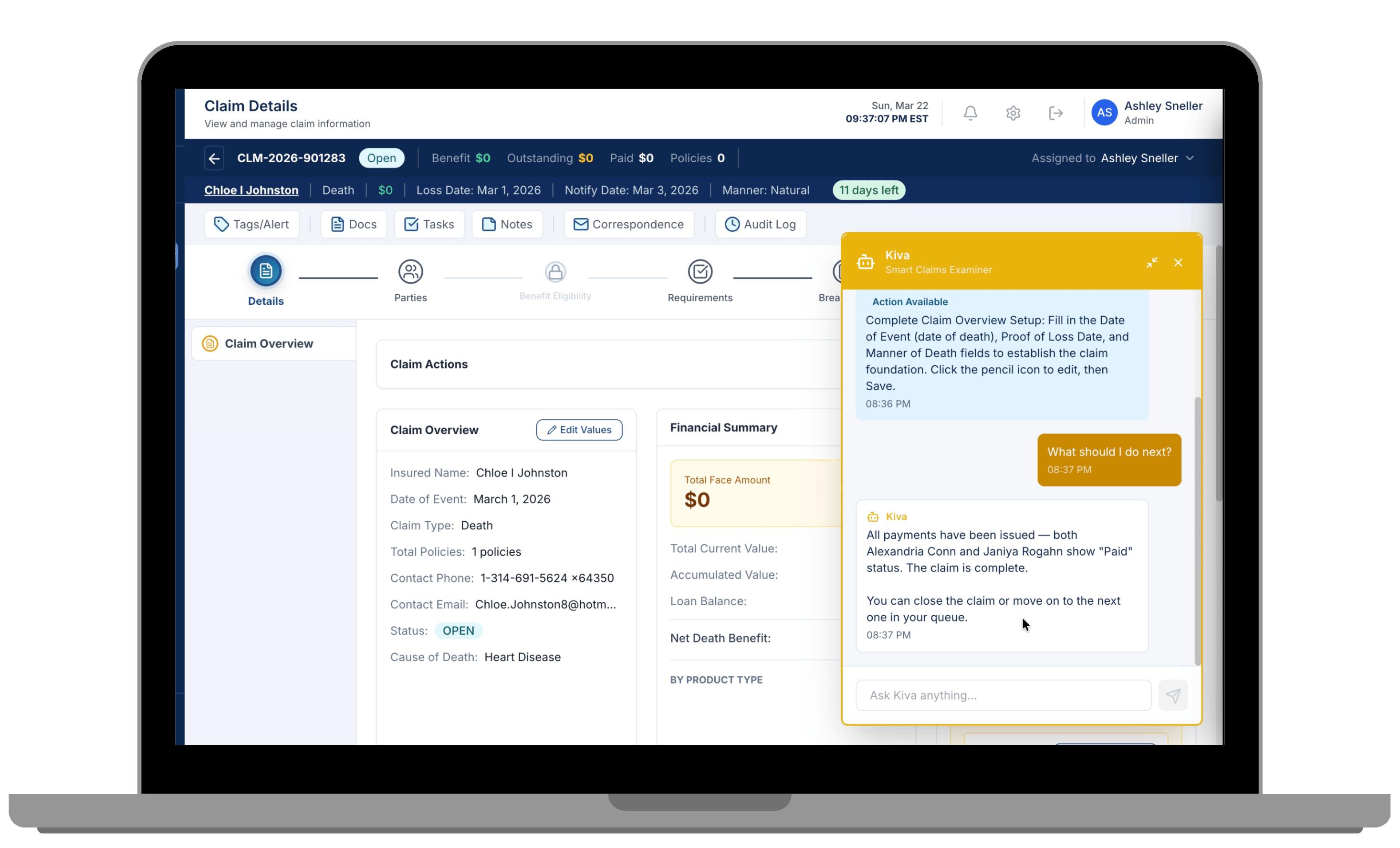
Kiva is your smart claims assistant. Spot missing information, see what needs attention, and keep claims moving, with your team’s expertise and judgment guiding the process.
Folder with magnifying glass representing early identification of missing information.

Catch missing information earlier

Gear with play symbol representing guidance within the workflow.

Bring guidance into the workflow

Person with a checkmark representing human judgment and oversight.

Keep human judgement in control

Kiva AI assistant providing guidance alongside claim details in the Benekiva claims workbench.

Examiners shouldn’t have to keep every requirement in their heads

Claims professionals bring value through how they interpret information, recognize exceptions, and decide what needs a closer look. Kiva reduces the burden of remembering, searching, and navigating so more attention can stay on the work that requires judgment.

Catch requirements before they become delays

Kiva brings gaps like a missing death certificate or an incomplete beneficiary form into view as examiners work in a claim, so they can catch what’s missing before the file moves forward.

Make the next step clearer

Kiva surfaces what may need attention next based on where the claim is in the workflow, while the examiner remains responsible for deciding how to proceed.

Ask without leaving the claim

Examiners can ask Kiva a question and bring relevant claim or workflow information closer to the work instead of searching through separate systems or reference materials.

Light blue abstract geometric network pattern with hexagons and connecting lines clustered in the bottom right corner.

Bring useful guidance into the workflow

Kiva helps reduce the memory and navigation burden of claims work without turning the claim over to AI.

Notification bell representing proactive tips and reminders.

Proactive Guidance

Surface relevant tips and reminders while the examiner is working through the related part of the claim.

Document with a question mark representing incomplete information.

Missing Information Detection

Bring incomplete requirements and documentation into view before they create downstream rework or delay.

Branching arrows representing next-step support.

Next-Step Support

Help examiners understand what may need attention next based on the claim’s current place in the workflow.

Browser help message representing contextual questions within a claim.

Contextual Questions

Give examiners a way to ask questions and find relevant information without leaving the claim.

Give examiners more support for the work that needs their judgement

Request a Demo →

Practical AI while keeping humans in the loop

Person sitting on a beige couch typing on a MacBook laptop, wearing blue denim shorts and a dark top.

What should AI take off a claims examiner's plate?

Brent Williams, Krista Eger, and Jim Girard explore what AI support should look like, why difficult claims need better tools, and what should remain in human hands.

Read more →

Smiling businesswoman in a black blazer using a laptop and talking on her phone at a modern office desk by a window with wooden panel background.

Technology doesn't replace empathy in claims. It makes space for it.

See where common claims processes create unnecessary friction and what teams can change before automating them.
‍
Read more →

Person typing on a laptop displaying the ChatGPT interface in dark mode, sitting at a table with a pair of eyeglasses nearby.

12 Questions Carriers Should Ask Vendors About Their AI

Jim Girard discusses how carriers can evaluate AI vendors beyond the hype by focusing on strategy, security, data privacy, and practical operational value.

Download the Guide →

Explore more solutions

Claims Workbench

Bring claim details, requirements, tasks, and decisions together in the examiner experience where Kiva provides support.

Explore capability

Gray arrow pointing right enclosed by a semicircular arc on its left side.

Intelligent Document Processing

Extract information from incoming documents so examiners can review it in context and spend less time re-keying data.

Explore capability
Gray arrow pointing right enclosed by a semicircular arc on its left side.

Claim Submission

Capture structured claim information and supporting documents digitally so examiners begin with a clearer claim record.

Explore capability
Gray arrow pointing right enclosed by a semicircular arc on its left side.
Light blue abstract geometric network pattern with hexagons and connecting lines clustered in the bottom right corner.